
FD3 Protected Design Editor
FREE WORDPRESS PLUGIN
FD3 Protected Design Editor
Turn WordPress’s plain password-protected pages into branded, professional login cards, with live preview, one-click design presets and a real “wrong password” message.
Created by Frank Deardurff · Works with WordPress 5.8+ and PHP 7.4+
The Problem With WordPress Password Pages
Password-protecting a page in WordPress is easy. What your visitor sees is not great. WordPress shows a bare text box, a plain grey “Enter” button and almost no explanation of what the page is or what to do.
Worse, when someone types the wrong password, WordPress simply reloads the page. No error. No hint. Your client or member just sits there wondering if the link is broken, and then they email you.
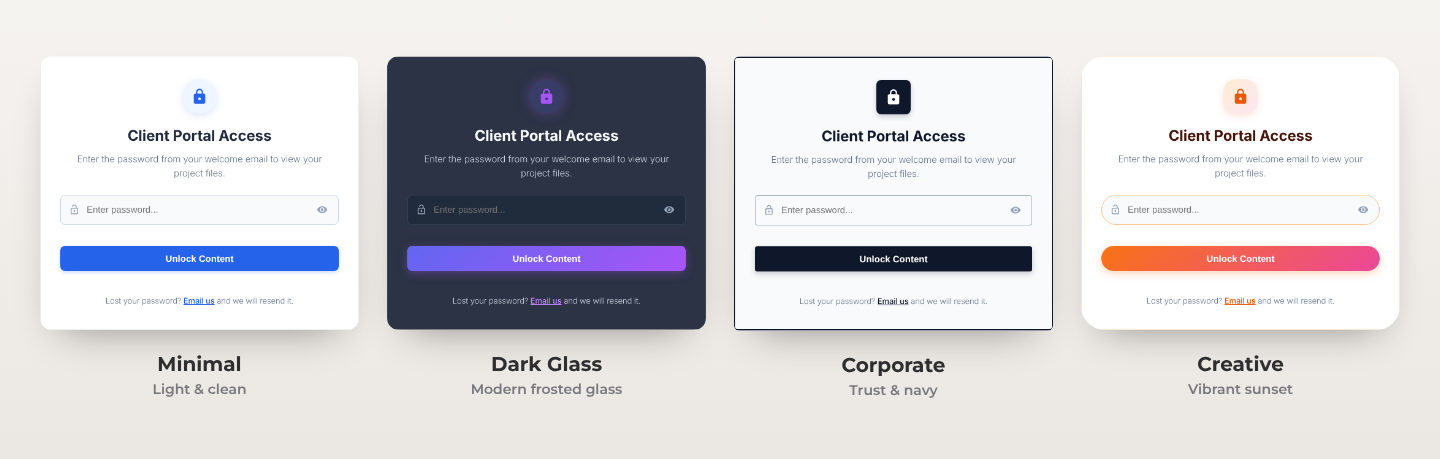
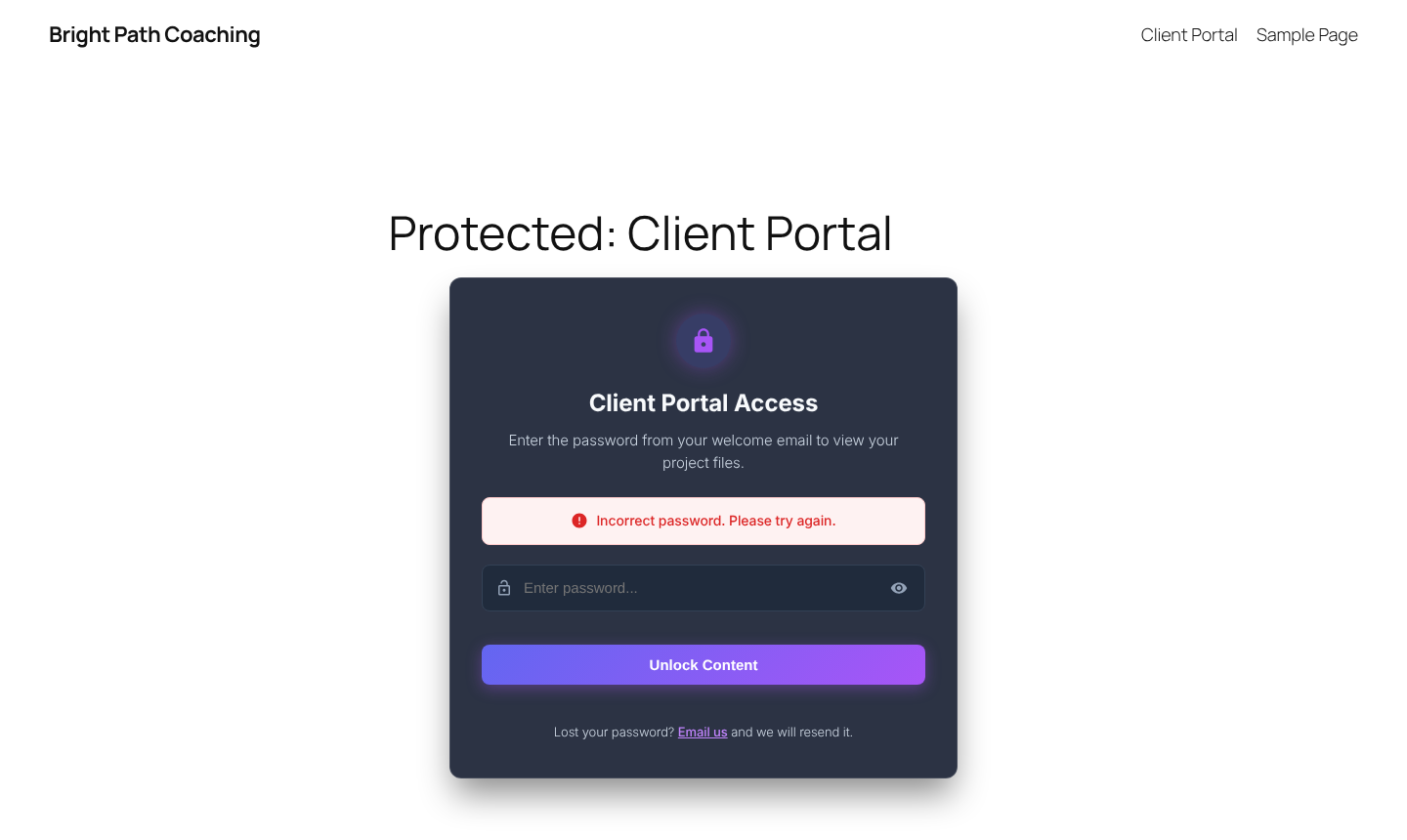
I built Protected Design Editor to fix that. It keeps WordPress’s own password protection exactly as it is and replaces only what your visitors see: a clean, branded card with a clear headline, instructions, a button that matches your site, and a friendly message when the password is wrong.
Before and After
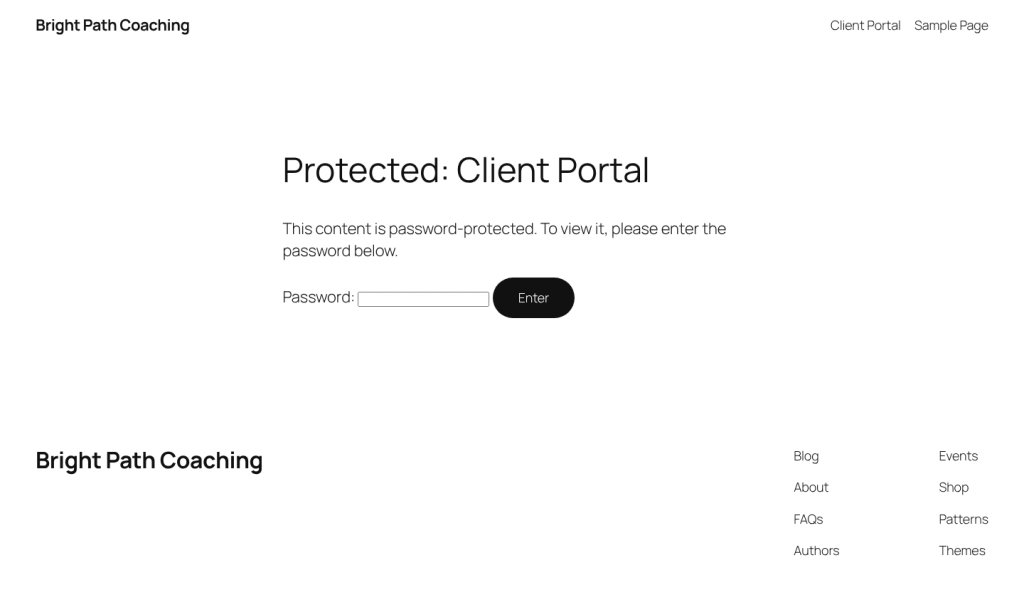
Before: the WordPress default
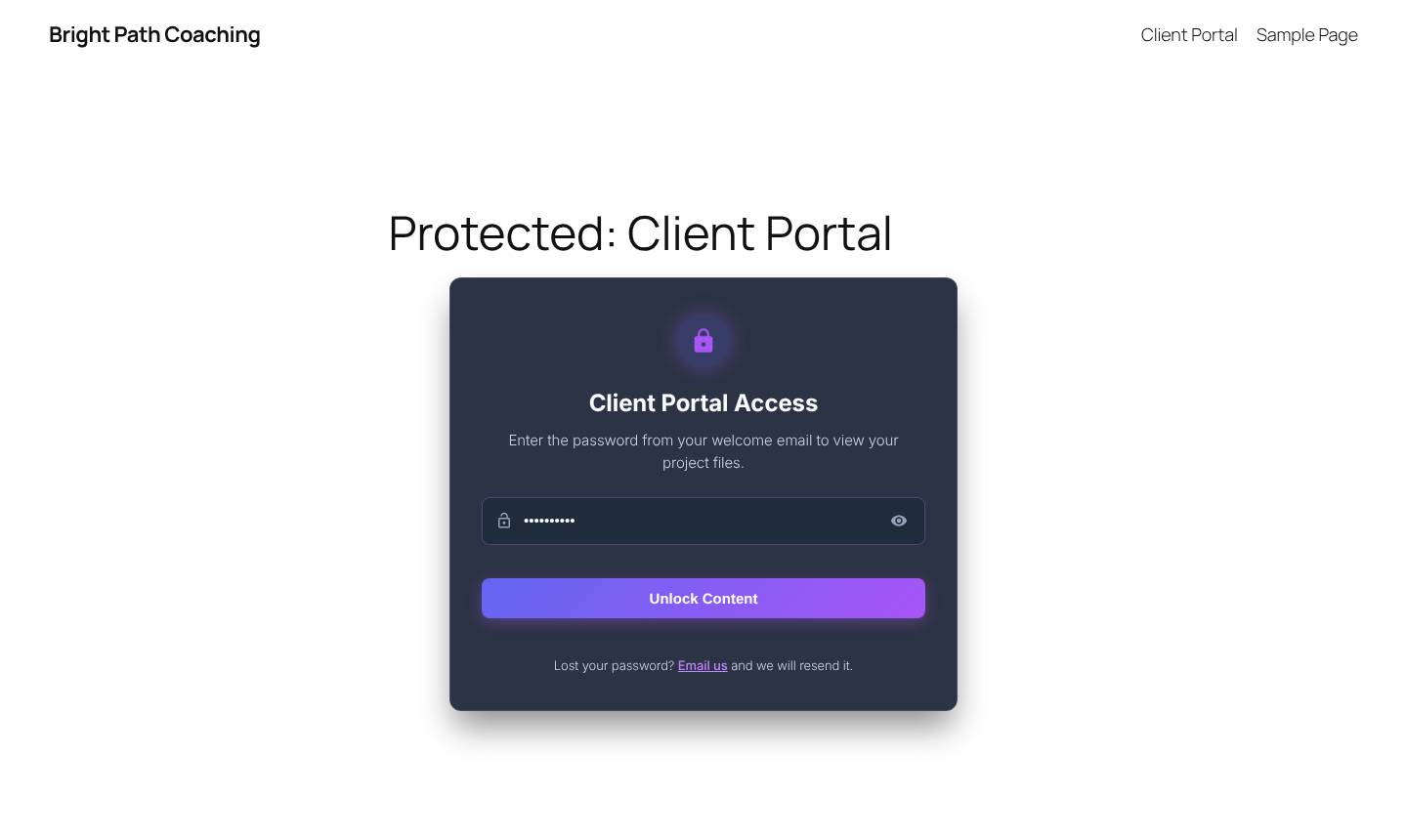
After: with Protected Design Editor
Key Features
One-Click Design Presets
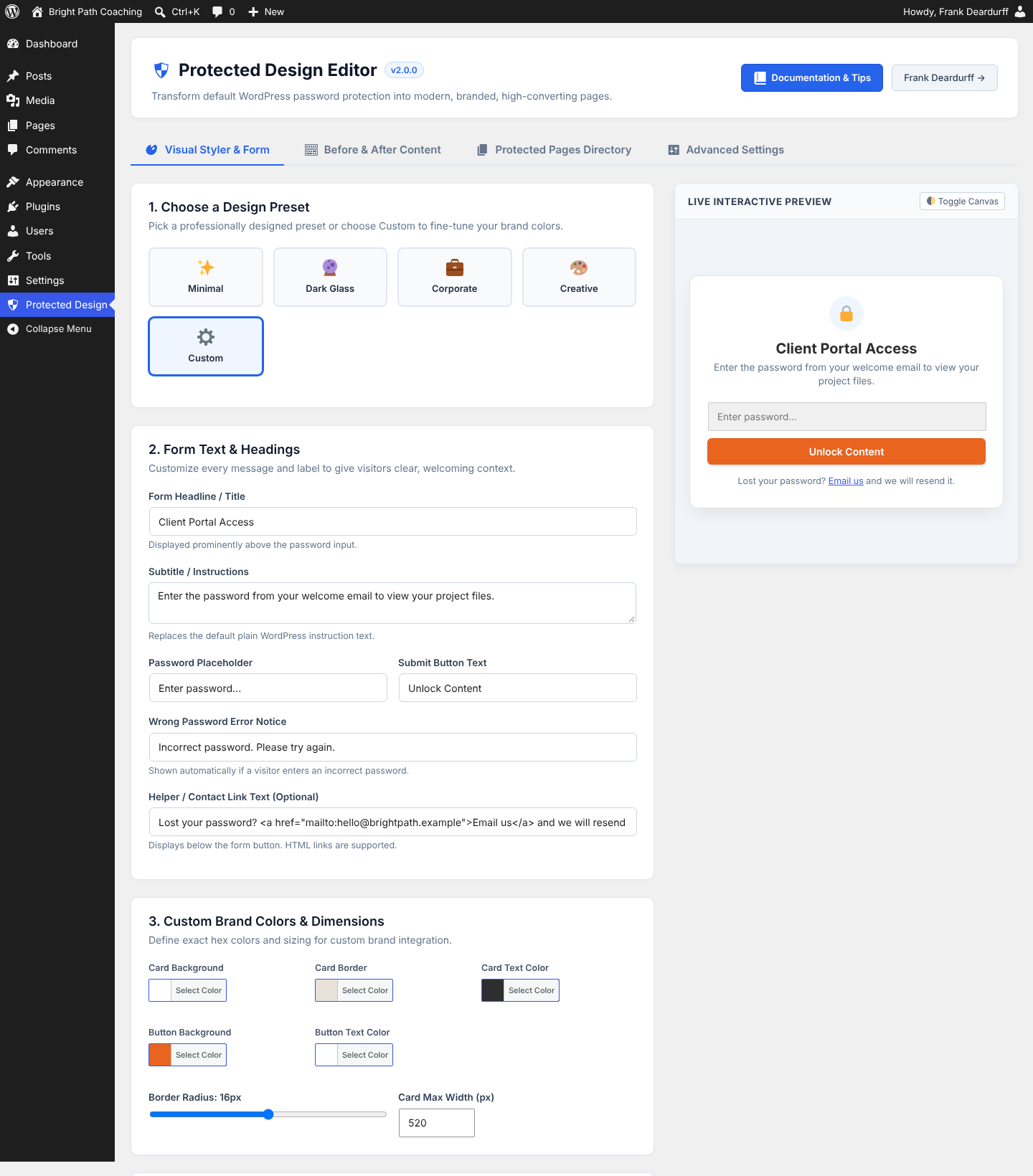
Start from Minimalist Clean, Modern Dark Glass, Corporate Trust or Creative Vibrant, or use the Custom Brand Styler to set your own card, border, text and button colors and corner radius.
Live Preview
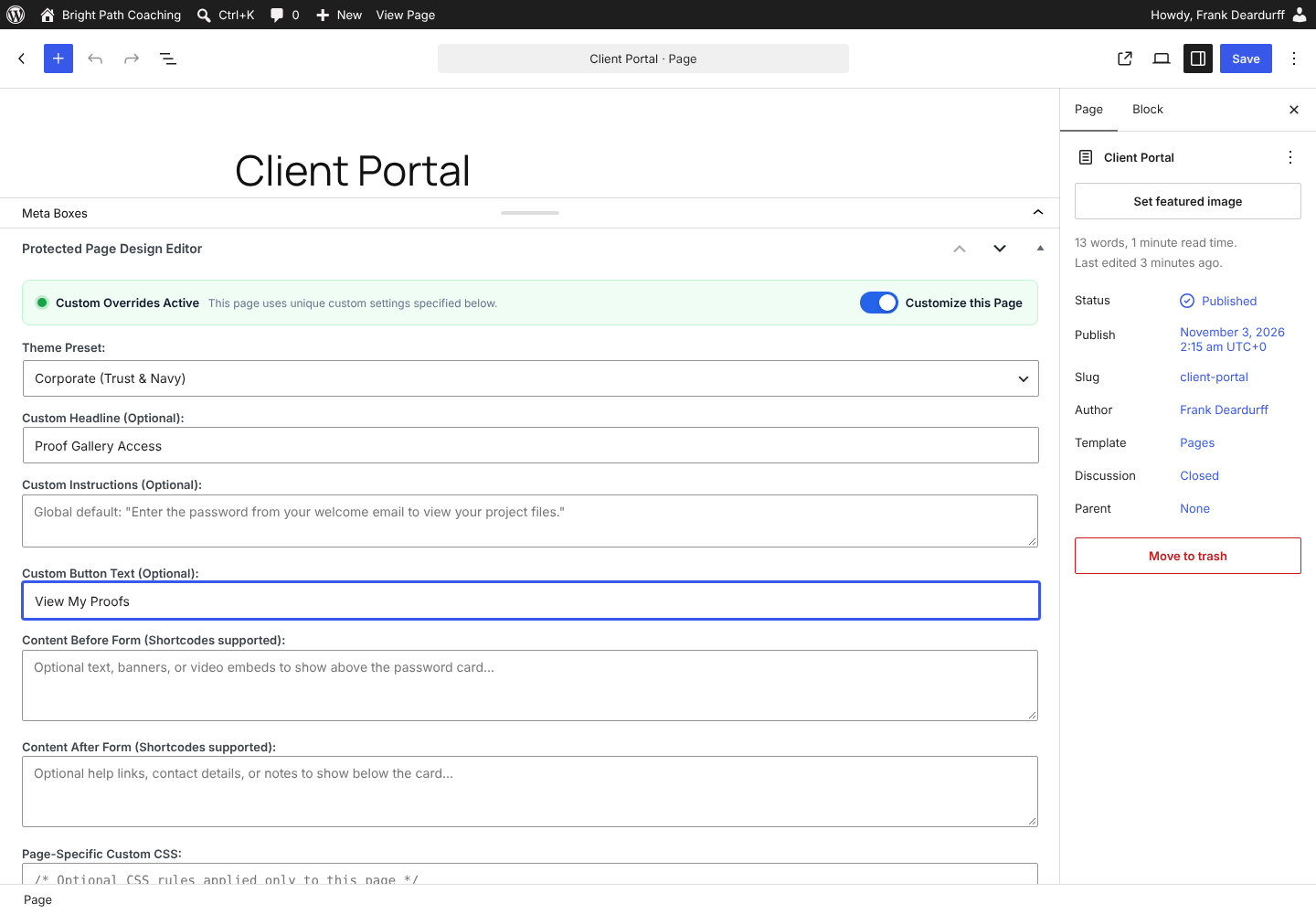
See every change in real time in your dashboard before you save. No guessing, no flipping back and forth between tabs.
“Wrong Password” Alerts
When a visitor enters the wrong password, they get a clear, friendly notice instead of a silent page reload.
Show/Hide Password
A built-in eye icon lets visitors reveal what they’ve typed, so fewer people get locked out by a typo.
Your Words, Not WordPress’s
Set the title, instructions, input placeholder, button text and helper or support links.
Content Before & After
Add text, images, video or shortcodes above or below the form, such as a contact form, a welcome video or member FAQs.
Per-Page Designs
Use one design site-wide, or override it on any page or post from the editor’s meta box.
Lightweight
Pure CSS and vanilla JavaScript with pre-built static files. No frameworks and nothing slowing your site down.
Works With Your Theme
Gutenberg, Elementor, Divi, Beaver Builder, Astra, Kadence and classic themes.
See It in Action
Who It’s For
- Client portals and proofing galleries. Designers, photographers and consultants can welcome clients with a branded page that feels like a custom app.
- Member and VIP content. Webinar replays, downloads, bonus pages and private event details.
- Draft previews and staging. Show stakeholders a polished review page instead of the WordPress default.
Get Started in Five Minutes
- In your WordPress dashboard, go to Plugins ? Add New.
- Search for FD3 Protected Design Editor, then click Install Now and Activate.
- Open Protected Design in the admin sidebar.
- Pick a preset, change the text to suit your site and check the live preview.
- Click Save Changes. Every password-protected page now uses your new design.
Frequently Asked Questions
Does this change how WordPress password protection works?
No. It keeps WordPress’s built-in password hashing and cookie sessions exactly as they are. Only the front-end design and the visitor experience change.
Can I give individual pages a different design?
Yes. When you edit any page or post, scroll to the Protected Page Design Editor box, check the box to enable custom styling, and choose a preset, headline or content just for that page.
Can I use shortcodes before or after the password form?
Yes. The Content Before and Content After areas support shortcodes, so you can add contact forms, login links, video and more.
Will it work with my theme or page builder?
It’s built to work with Gutenberg, Elementor, Divi, Beaver Builder, Astra, Kadence and classic themes.
Is it really free?
Yes. Protected Design Editor is free and open source (GPLv2 or later) and available from the official WordPress.org plugin directory.
Where can I get help or suggest a feature?
Use the support forum on the plugin’s WordPress.org page, or contact me here.
What’s New in Version 2.0
- Four ready-made design presets plus the Custom Brand Styler
- Real-time live preview in the dashboard
- “Wrong password” error notice
- Show/hide password toggle
- Per-page design overrides from the post and page editor
- Faster pre-built static files, full translation support and an optional clean-uninstall setting
Like This Plugin?
Protected Design Editor is free and always will be. If it saved you time or made your site look better, a little chai helps keep it updated.
Need more than a plugin? WP Just Fix It handles WordPress fixes and maintenance, and I can build a custom app or plugin for you.
About the Creator
Protected Design Editor was created by Frank Deardurff, a WordPress developer with more than 20 years of building websites and web software. Frank also created PayBlue, Yurpl, SupportDsk and PushTimer, along with free tools like CSS Generator.
Need something custom for your WordPress site? Let’s talk about building it.