
The Subject Line & Preview Text Swipe File
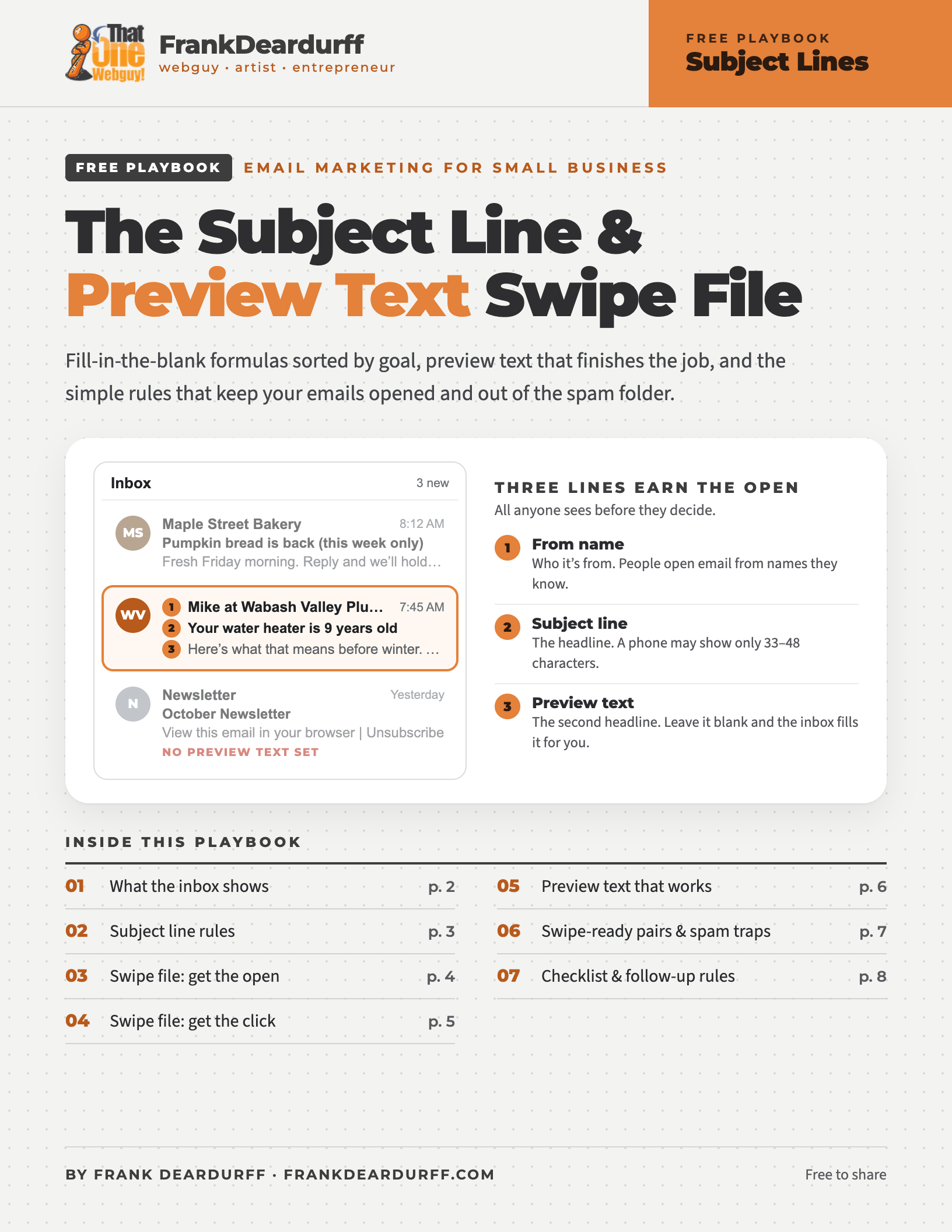
Free 8-page swipe file · email marketing for small business
Fill-in-the-blank subject line formulas sorted by goal, preview text that finishes the job, and the simple rules that keep your emails opened and out of the spam folder. Built for small businesses that send their own email, with real examples you can swipe and adapt.
Download the free PDFThree lines earn the open
Before anyone reads a word of your email, they decide from three short lines in the inbox: the from name (who it’s from), the subject line (the headline) and the preview text (the second headline). On a phone, much of your subject line gets cut off, so the first few words do most of the work.
How much of your subject line shows
Approximate characters before the cut-off. Counts vary with screen size and text settings. Source: ActiveCampaign.
The 30–50 rule
Aim for 30 to 50 characters. If it has to run longer, make sure the first 30 or so make sense on their own. “Your water heater is 9 years old…” still works when it’s cut off. “Fall maintenance tips and a speci…” doesn’t.
Get the from line right, too. Use a name people know (a person plus your business works well, like “Mike at Wabash Valley Plumbing”), keep it the same every send, and skip “no-reply” addresses. Replies are a good sign to inbox providers.
A note on open rates: Apple Mail’s Mail Privacy Protection can load your email in the background, and that counts as an “open” even if nobody read it. Treat open rates as a rough signal. Clicks, replies and sales tell you which subject lines really work.
Eight rules for subject lines that get opened
Be specific
Specific beats clever. “Your roof after Tuesday’s hail” beats “Important update.”
Lead with the good part
Put the words that matter in the first 30 characters.
One email, one idea
If the subject needs two “ands,” you’re writing two emails.
Match what’s inside
The law says your subject must reflect the email. Tricked readers unsubscribe.
Sound like a person
Write it the way you’d say it to a customer at the counter.
Use real numbers
Numbers catch the eye, but only true ones: real prices, dates and counts.
Easy on the urgency
“Last chance” only works when it is. Cry wolf once and they stop believing.
Check it on your phone
Send yourself a test. If the cut-off version makes no sense, rewrite it.
Before and after
| Before | After |
|---|---|
| October Newsletter | 3 things to do before your first freeze |
| Important information inside | Your service visit moved to Thursday |
| SALE!!! DON’T MISS OUT!!! | 20% off gutter cleaning through Friday |
| Checking in | Did the new contact form fix the missed calls? |
| We have some exciting news to share | We now deliver to West Terre Haute |
Never fake a “Re:” or “Fwd:”
Making an email look like a reply to a conversation that never happened is a deceptive subject line. It burns trust fast and can break the CAN-SPAM Act. The test: would you open it if it landed in your inbox from a business you barely know? If not, it isn’t done yet.
Subject line formulas you can swipe
Swap your own details into the brackets. Treat the examples as a starting point, not a script: your customers should hear you, not a template. The PDF has three examples for every formula, plus win-back lines for subscribers who’ve gone quiet.
| Goal | Formula | Example |
|---|---|---|
| A · Curiosity | The [thing] most [customers] get wrong | The furnace filter mistake most homeowners make |
| B · Benefit | [Result they want] without [hassle they hate] | A spotless kitchen without harsh chemicals |
| C · How-to | How to [get result] in [time] | How to winterize outdoor faucets in 10 minutes |
| D · Number or list | [Number] [things] to [do] before [date or event] | 3 questions to ask any contractor |
| E · Question | Is your [thing] [problem]? | Is your website scaring off customers? |
| F · Announcement | Now [new thing] | Now booking Saturday appointments |
| G · Offer | [Amount] off [specific thing] through [day] | $25 off drain cleaning through Friday |
| H · Deadline | [Offer] ends [day] | Holiday orders close Monday |
| I · Proof or story | How [customer type] [got result] | How a local bakery stopped missing phone orders |
| J · Personal | Quick question about [topic] | Quick question about your website |
Pay it off
A curiosity or question subject line is a promise. Answer it in the first two lines of the email, or readers learn to ignore you.
Merge tag safety
If you use a first-name tag, set a fallback like “there.” Otherwise a missing name sends “Quick question, ,” to half your list.
Preview text: your second subject line
Preview text (also called a preheader) is the short line that shows next to or under your subject. Most email tools have a box for it, right by the subject line. Leave it empty and the inbox grabs the first text it finds, often “View this email in your browser.” Aim for about 40 to 90 characters, best words first.
Same email, two ways
Don’t repeat the subject
You get two lines. Saying the same thing twice wastes one.
Finish the thought
Subject is the hook. Preview is the payoff, the detail or the reason to open now.
Best words first
Phones cut it short, so put the important part at the front.
Fill the space
If it’s very short, some apps tack on the next text in your email. Send a test and look.
Keep it honest
Same rule as subjects: the preview has to match what’s inside.
The AI summary twist
On iPhones and Macs with Apple Intelligence turned on, Apple Mail can show an AI-written summary in the inbox in place of your preview text. Gmail’s Gemini can summarize an email too, after it’s opened. You can’t control either one, but you can feed them: make the first two lines of your email say what the email is about.
Subject and preview pairs that work
| Pattern | Subject line | Preview text |
|---|---|---|
| Finish the thought | The furnace filter mistake | Most homeowners make it every winter. Here’s the 2-minute fix. |
| Answer the question | Ready for the first snow? | Book a plow spot by Nov. 15 and skip the waitlist. |
| Add the detail | Now booking Saturdays | 8 a.m. to noon. Reply to this email to grab a time. |
| Add the deadline | $25 off drain cleaning | Through Friday only. Mention this email when you call. |
| Lower the guard | Quick question about your website | No sales pitch. I just want your honest opinion. |
| Set expectations | Your November checklist | 5 quick jobs, about 20 minutes total. |
The pair test: read them together out loud. Do they sound like one thought? Does the preview add something new? Would they still work if the subject got cut off?
Spam-folder fast tracks
The fastest ways to lose the inbox, or break the law
- Fake “Re:” or “Fwd:” and bait-and-switch subjects. The FTC says your subject line must accurately reflect the email. Each violating email can cost up to $53,088.
- ALL CAPS, piles of !!! and $$$. Looks like spam to people and filters alike.
- No working unsubscribe. CAN-SPAM requires a clear opt-out, honored within 10 business days. Gmail and Yahoo want one-click unsubscribe from bulk senders.
- Sending from an unprotected domain. Gmail, Yahoo and Outlook.com require SPF, DKIM and DMARC from bulk senders (around 5,000+ emails a day). Set them up no matter your size.
- Too many spam complaints. Gmail asks bulk senders to keep reported spam under 0.1% and never reach 0.3%. Only email people who asked to hear from you.
- One big image and no text. Nothing for the preview, nothing for screen readers, and an empty inbox line.
Before you hit send
Subject line
- Specific and honest
- Key words in the first 30 characters
- 30–50 characters, or the front stands alone
- No fake Re:/Fwd:, no ALL CAPS
- Only real numbers and real deadlines
Preview text
- Filled in, not left blank
- Adds something the subject didn’t
- About 40–90 characters
- First lines of the email say the point
- Pair passes the read-aloud test
Before sending
- From name people recognize
- Reply-to that takes replies
- Unsubscribe link works
- Test sent to your phone and desktop
- Name tags have a fallback
Bonus: follow-up series rules
For quotes, inquiries and abandoned carts: use a new subject every time, add something new to each email (“just checking in” isn’t new), give it a few days between sends, stop when they act, decide how many emails before you write them, and read the subjects in a row. As a set, they should tell a story.
Email 1
Your quote is ready
Email 2
The question we get most about new roofs
Email 3
What the Hendersons said after theirs
Email 4
Should I close out your quote?
Checked October 2026. Email apps change how they show subjects and previews often, and character counts vary by device. Not legal advice; see the FTC’s CAN-SPAM guide for the full rules.
Keep it by your desk
Get the free 8-page swipe file
All ten formulas with three examples each, win-back lines, the pairs that work, spam traps and the before-you-send checklist.
Not sure your domain is set up right?
Checking SPF, DKIM and DMARC is quick, and the fix is usually a few DNS records. I can check it for you.
More from the free playbook library
The Google Business Profile Playbook, Brand Message Playbook and Social Media Size Cheat Sheet, plus prompt playbooks for Microsoft Copilot, Claude, ChatGPT, Google Antigravity, Gemini and Meta AI. See the full library.
Free to share and print. See the copyright and sharing policy. Gmail, Outlook, Apple Mail and other product names are trademarks of their owners; this guide is independent and not affiliated with them.